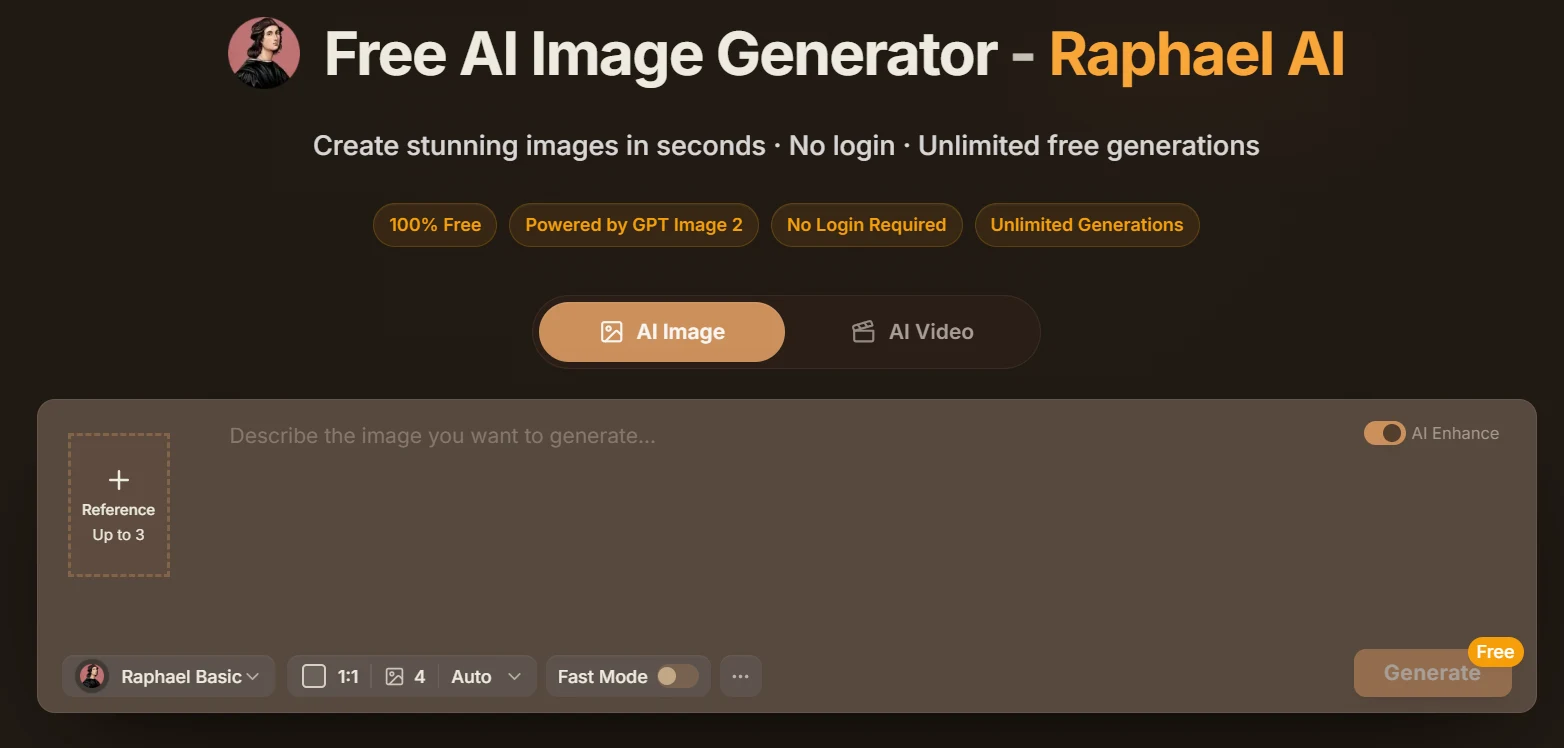
Here is a problem most creative people run into at some point: you need a specific image — something that does not exist in any stock library, something that fits exactly what you are working on — and the tools that can actually produce it cost money you have not budgeted for. Midjourney runs $10 a month minimum. DALL-E burns through credits. Stable Diffusion works but requires technical setup most people do not have time for. It is a surprisingly frustrating situation when all you want is a decent AI-generated image for a blog post, a social media graphic, or a project mockup. Raphael AI was built to remove that friction entirely.
The platform offers AI image generation through a clean browser interface, at no cost, with no watermarks on the output. You describe what you want, pick a visual style, and get a generated image back in seconds. The pitch is simple. The question worth asking is whether it actually holds up — and who gets the most genuine value from it compared to the paid alternatives people are already using.
This review covers how Raphael AI works in practice, what its real strengths are, where it falls short, and whether it belongs in your creative toolkit.
⚡ Quick Summary: Is Raphael AI Worth Using?
- What it is: A free browser-based AI image generator that converts text prompts into high-quality original images.
- Best for: Bloggers, content creators, social media managers, marketers, students, freelancers, and small business owners.
- Key advantage: High-quality AI image generation at zero cost — no subscription, no watermarks, no installation.
- Worth using if: You need custom AI-generated visuals regularly but do not want to commit to a paid image generation subscription.
- Key limitation: Free tiers on any platform come with usage constraints — verify current limits on the official Raphael AI website.
What Is Raphael AI?
Raphael AI is a web-based free AI image generator that translates written text descriptions into original images using a powerful AI art model. You type what you want to see — a subject, a setting, a mood, a visual style — and the platform generates a new image from scratch based on your words. No templates, no stock photo browsing, no manual design work.
The core appeal is accessibility. A lot of creators who would genuinely benefit from AI image generation are priced out of the best-known tools, or are not sure the investment makes sense for occasional use. Raphael AI removes the cost barrier from the equation. The target audience is wide: bloggers who need featured images, marketers building ad creatives, students working on presentations, social media managers who need visual variety, designers looking for fast ideation tools, and freelancers who want to expand what they can produce for clients without adding to their software budget.
What sets it apart from simply using a free trial somewhere else is that Raphael AI positions itself as a long-term free option — not a demo that runs out after ten images. The platform is built around the idea that quality AI image generation should not be gated behind a subscription for users who have regular but not enterprise-scale needs.
Quick Product Overview
| Feature | Details |
|---|---|
| Product Name | Raphael AI |
| Category | AI Image Generator |
| Pricing | Free (verify current tiers at official website) |
| Best For | Creators, Marketers, Bloggers, Designers, Students |
| Platform | Web-Based (browser, no installation) |
| Primary Function | Text-to-Image Generation |
| Output | High-quality images, multiple styles supported |
| Watermarks | No watermarks on generated images |
Why Creators Keep Hitting a Wall With Expensive AI Image Tools
The AI image generation space has matured quickly over the past few years, and the tools have genuinely gotten impressive. The problem is that most of the genuinely capable options come with real cost attached. Midjourney requires a monthly subscription. DALL-E runs through OpenAI credits. Adobe Firefly is tied to the Creative Cloud ecosystem. Even Stable Diffusion, which is technically free and open source, requires either a capable GPU you need to own and maintain, or a third-party hosted version that often charges for usage.
For someone who needs AI-generated images consistently — a blogger, a small business owner, a freelancer — this pricing structure creates a real decision point. Do you subscribe to one of the premium tools and factor that cost into your budget? Use a free trial and run out? Try to make do with stock photo libraries that never quite have what you actually need?
The free tier with genuine capability — not a teaser, not a heavily restricted demo — is where Raphael AI differentiates itself. Whether that free access level actually meets your needs depends on how heavily you use it and what you need it to produce. But the premise is sound: accessible AI image generation for the broad middle of the creator market.
Key Features of Raphael AI
Here is an honest look at what Raphael AI actually offers and where each feature sits within a real creative workflow.
Free AI Image Generation
The defining feature is the free access itself — and it is worth being specific about what "free" means here. Raphael AI offers text-to-image generation without requiring a paid subscription to get usable results. The output is not watermarked, and you are not navigating a credit system that drains with every image.
For bloggers who publish multiple times a week and need a custom featured image for each post, this matters. For a freelancer who generates mockup visuals for clients during the proposal stage, this matters. The free access changes the economics of using AI image generation as a regular part of your workflow rather than an occasional tool you pull out when you can justify the cost.
Text-to-Image Creation
The core mechanic is text-to-image generation: you describe what you want in natural language, and Raphael AI builds an original image around that description. This is the same fundamental capability that drives Midjourney, DALL-E, and Stable Diffusion — the difference is in the underlying model quality, the interface, and the cost structure.
The text interpretation is genuinely solid. You can describe complex scenes — "a minimalist home office with warm afternoon light, plants on the windowsill, a laptop open on a wooden desk, photorealistic style" — and get an image that actually captures the intent rather than producing a generic approximation. That interpretive quality is what separates capable AI image generators from the basic ones that miss half of what you describe.
Multiple Art Styles
Raphael AI supports a substantial range of visual styles, which makes it usable across very different creative contexts without feeling limited to one aesthetic. Photorealistic imagery for product visuals and blog features. Digital illustration for branded content and social media. Anime and manga-inspired art for entertainment and fandom content. Painterly and watercolor aesthetics for creative projects. Cinematic and dramatic visual styles for storytelling content. Abstract and conceptual art for design and editorial use.
The style range matters because different projects call for completely different visual approaches. A health and wellness blog needs something clean and warm. A tech publication wants something sharp and modern. A gaming or entertainment channel might want dramatic fantasy imagery. Raphael AI's multi-style support means you are not locked into a single visual identity across everything you create.
High-Quality Outputs
Raphael AI uses a capable AI model that produces image outputs with genuine detail and visual coherence — not the muddy, artifact-heavy results that early-generation AI image tools were known for. The outputs handle complex compositions, accurate lighting, realistic textures, and consistent subject rendering across the image frame.
For practical use cases — a blog featured image, a social media graphic, a marketing visual, a presentation slide — the quality is more than adequate. For high-stakes production use like large-format print, premium brand campaigns, or publishing where image quality is scrutinized at the professional level, additional context matters and results should be evaluated carefully before deployment.
Fast Rendering
Image generation on Raphael AI runs in the range of 10 to 30 seconds per prompt under normal conditions. That is fast enough to iterate meaningfully — you can try a prompt, see the result, refine the description, and generate again within the same working session without it becoming a waiting exercise.
Speed matters more than it initially seems for creative workflows. When generating images is fast, you naturally experiment more. You try more variations. You discover what works and what does not within the same session rather than committing to one output and moving on because regenerating would take too long. That iterative loop is where a lot of the real value in AI image generation actually lives.
Beginner-Friendly Interface
The interface is clean enough that someone who has never used an AI image generator before can figure it out without a tutorial. Text input field for your prompt. Style selection. Generate. That is basically the whole interaction for a basic use case. There are no complex parameter sliders to understand, no sampling methods to configure, no model version numbers to keep track of.
For someone coming from a background of stock photo browsing — where you just type what you want and scroll results — the transition to AI image generation with Raphael AI is about as smooth as it gets. You are still typing what you want to see. You are just getting an original image generated around that description instead of browsing an existing library.
Creative Prompt Support
Raphael AI handles detailed and nuanced prompts well — not just simple object descriptions but layered creative direction that specifies mood, lighting, composition, color temperature, visual style references, and scene context together. A prompt like "a cozy independent bookshop interior in autumn, warm amber lighting, wooden shelves overflowing with books, a reading chair near a rain-streaked window, impressionist painting style" translates into a coherent, atmospheric image rather than a confused approximation.
That capability to interpret complex creative intent is what separates this from simpler image generation tools and makes it genuinely useful for creative professionals who have specific visual ideas they are trying to realize, not just generic placeholders they need to fill space.
No Watermarks on Downloads
One of the more practically important features is that Raphael AI's outputs do not come with watermarks on the free tier. A watermarked image is not actually usable for most real creative purposes — you cannot publish a watermarked blog image, use a watermarked graphic in a client presentation, or post a watermarked visual on social media without it looking obviously like a tool demo. Raphael AI's clean outputs mean what you generate is actually deployable, not just a preview of what you could use if you upgraded.
How Raphael AI Works: Step-by-Step
The actual workflow is intentionally simple. Here is exactly what the process looks like from opening the page to downloading your image.
Step 1 — Visit Raphael AI: Open a browser and go to the Raphael AI platform. No software installation, no app download. The platform runs entirely in your browser, so you can use it on any device — desktop, laptop, or mobile — without setup.
Step 2 — Enter Your Prompt: Type a description of the image you want to create. Be specific about what you want to see: the subject, the setting, the mood, the visual style, the lighting, and any other details that define the image in your head. More descriptive prompts consistently produce more relevant, coherent results.
Step 3 — Choose Style Options: Select the visual style you want from the available options — photorealistic, illustrated, cinematic, anime, abstract, or others depending on what the platform currently supports. Style selection is the fastest way to ensure the generated image fits the visual context of the project you are working on.
Step 4 — Generate Your Image: Click generate and wait for the AI to process your request. Generation typically completes within 10 to 30 seconds. The platform's server handles all the computation — your device just displays the result.
Step 5 — Review and Refine: Look at the output. If it is not quite right — wrong composition, different mood than expected, an element that missed the mark — refine your prompt and generate again. Small adjustments to phrasing can produce noticeably different results. Iteration is built into the workflow, so do not treat the first output as a single shot.
Step 6 — Download and Use: Once you have an image you are happy with, download it. Clean output, no watermark, ready to publish, share, or deploy in your project. The file is yours to use within whatever terms the platform's current service agreement specifies — always worth a read for anything going into commercial contexts.
Real-World Use Cases
The practical value of Raphael AI becomes clearest when you look at specific creators with specific needs — and what changes when a free, capable AI image generator is part of their toolkit.
Content Creators
The Creator Who Needs a Fresh Image for Every Piece of Content
A content creator publishing three or four articles or videos per week needs visual assets to match. Stock photo libraries either do not have what they need at all, or have so many people using the same images that the content starts to look like everyone else's. Raphael AI gives this creator original, on-theme images that do not exist anywhere else — generated fast enough to keep up with a real publishing schedule. The free access means this is not adding a line item to an already stretched content budget.
Bloggers
The Blogger Who Needs Custom Featured Images Without Stock Photo Fatigue
A blogger covering niche topics — personal finance strategies, travel planning for specific regions, home cooking techniques — knows the frustration of stock libraries that do not actually have what they need. Generic coffee-cup-and-laptop photos do not represent the specific content being published. Raphael AI lets a blogger generate a featured image that directly reflects what the article is about — a specific scene, a specific mood, a visual that a reader would recognize as matching the content. That specificity improves click-through rates and makes the blog look more intentional and professional.
Social Media Managers
The Social Media Manager Producing High-Volume Visual Content Across Platforms
Managing social media for a brand means producing a lot of visual content — every week, across multiple platforms, with enough variety that the feed does not go stale. Stock photography gets repetitive fast, and commissioning custom photography for every post is not remotely cost-effective. Raphael AI fits into this workflow as a fast, free source of original visuals that match the campaign's visual direction for the week. Different styles for different post types, all generated from text descriptions, without per-image costs stacking up.
Digital Marketers
The Performance Marketer Building Ad Creative Variations at Speed
Paid advertising requires visual variety. The same creative running against the same audience gets stale quickly — creative fatigue is a real performance problem. A performance marketer who can generate multiple visual variations of a concept using Raphael AI has the ability to test more creative directions without commissioning each one from a designer. Even if the AI-generated images need light editing before final ad deployment, the speed and cost of the ideation phase changes dramatically when image generation is free and fast.
Small Businesses
The Small Business Owner Building a Visual Brand on a Real Budget
A bakery, a boutique clothing store, a local consulting firm — any small business that needs professional-looking visuals for their website, social media, and marketing materials but does not have the budget for a design retainer or regular photography sessions gets real value from Raphael AI. Generating a custom image that matches the business's atmosphere and aesthetic — warm, specific, original — is achievable without professional design help or a software subscription. For solopreneurs running every aspect of their business themselves, that kind of creative accessibility is not a small thing.
Students
The Student Who Needs Original Visual Assets for Academic and Portfolio Projects
Design students, communications students, and anyone working on portfolio projects that require original imagery face the same challenge: stock photos look generic, and producing custom photography requires equipment and skills most students are still developing. Raphael AI gives students access to original, custom visuals they can use in academic projects, portfolio pieces, and presentations — without budget constraints or platform complexity getting in the way of actually completing the work.
Freelancers
The Freelance Designer Using AI for Rapid Creative Exploration
A freelance graphic designer or creative director does not always need AI-generated images as final deliverables — sometimes what they need is a fast way to explore visual directions before committing to a full design approach. Raphael AI works as an ideation tool that generates visual references for client presentations, mood board development, and concept exploration. Generating ten visual directions in twenty minutes to show a client three viable options is a workflow that saves hours of preliminary design work and focuses client feedback at a stage where changes are still easy to make.
Designers Seeking Inspiration
The Designer Who Uses AI to Break Through Creative Blocks
Staring at a blank canvas is a real productivity killer for visual creatives. Raphael AI works as a prompt-driven idea generator — you describe a direction, see what the AI produces, and use that as a jumping-off point for your own work rather than starting from complete scratch. The output does not need to be the final piece. It just needs to be specific enough to give your creative process something concrete to react to. For designers, that starting point often makes the difference between an unproductive afternoon and a productive one.
Benefits of Using Raphael AI
The advantages of adding Raphael AI to your creative toolkit go beyond just "it is free." Here is a more complete picture of what changes when you have access to this kind of tool.
- Zero cost to start: No subscription required, no credit card needed to generate usable images. The barrier to first use is essentially zero — you open a browser and start generating.
- No watermarks on outputs: What you generate is actually publishable. Clean downloads mean the images are immediately deployable rather than requiring an upgrade to remove branding.
- Speed of generation: Images in 10 to 30 seconds is fast enough to support an iterative workflow. You try a prompt, see a result, adjust, and try again — all within the same working session.
- No installation required: Browser-based means any device with internet access works. Desktop, laptop, tablet — you are not tied to a specific machine or operating system.
- Original images every time: Every generated image is unique to your prompt. You are not competing with other users who downloaded the same stock photo from the same library.
- Wide style range: One platform, many different visual aesthetics — photorealistic, illustrated, cinematic, abstract, and more. Useful across very different content and creative contexts.
- Beginner accessible: No prior design knowledge, no prompt engineering expertise, no technical background required to get good results from day one.
- Reduces stock photo dependence: Stop browsing libraries for images that never quite fit your specific content. Generate something that actually matches what you are trying to communicate.
- Scales with creative ambition: As you develop better prompting skills, the quality and specificity of what you can generate improves — the tool grows with your ability to describe what you want clearly.
- Practical for teams: Multiple team members can generate images independently without sharing a credit pool or waiting for one person to process a queue of requests.
Pros and Cons
✓ Pros
- Genuinely free — usable without a subscription
- No watermarks on downloaded images
- Browser-based — no installation or setup required
- Fast generation (10–30 seconds per image)
- Supports a wide range of visual styles
- Handles detailed and complex text prompts well
- Beginner-friendly interface with minimal learning curve
- Original images — not stock photo repurposing
- Useful for both professional and personal creative work
- Accessible on any device with an internet connection
- Reduces creative workflow costs significantly
- Practical for rapid ideation and creative exploration
✗ Cons
- Free tier may have usage limits during high traffic periods
- Absolute image quality ceiling below top paid tools like Midjourney
- Generation speed can vary under heavy server load
- Complex prompts occasionally produce unexpected results
- Commercial use terms require direct verification
- Limited fine-grained control compared to advanced desktop tools
- Consistency across a large batch of images can vary
Raphael AI vs Other AI Image Generators
Raphael AI does not exist in isolation — there are several well-established AI image tools it sits alongside. Here is an honest comparison across the platforms most people are likely to consider.
| Platform | Pricing | Image Quality | Ease of Use | Watermarks | Installation | Style Range |
|---|---|---|---|---|---|---|
| Raphael AI | Free | Strong | Very Easy | None | Browser only | Wide |
| Midjourney | From $10/mo | Exceptional | Moderate (Discord) | None (paid) | Discord-based | Very Wide |
| DALL-E (OpenAI) | Credit-based / ChatGPT Plus | Very Strong | Easy | None (paid) | Browser only | Wide |
| Stable Diffusion | Free (self-hosted) | Very Strong | Complex | None | Local GPU required | Extensive (with models) |
| Adobe Firefly | Creative Cloud subscription | Strong | Easy | None (paid) | Browser + CC apps | Moderate |
| Canva AI | Freemium / Pro | Moderate | Very Easy | Watermark (free) | Browser only | Moderate |
The pattern here is direct. Midjourney produces the highest artistic quality in the market but requires a paid subscription and operates through Discord — a barrier for many casual users. DALL-E is excellent but credit-based, which means cost accumulates with usage. Stable Diffusion is free and powerful but demands technical setup that most non-technical creators are not equipped to handle. Adobe Firefly is polished but locked inside the Creative Cloud ecosystem. Canva's AI generation is accessible but outputs carry watermarks on the free tier and the image quality is not as capable for complex prompts.
Raphael AI sits in a specific gap: genuinely free, browser-accessible, no watermarks, no complex setup, and solid image quality for everyday creative needs. That combination is not common in the current market, and it explains why the platform draws consistent use from creators who are not willing to pay for the premium options but need something better than the watered-down free tiers of existing platforms.
Tips for Getting Better Results With Raphael AI
The difference between a mediocre AI-generated image and a genuinely useful one often comes down to how the prompt is written. Here are practical tips that actually improve output quality.
- Be specific about your subject: "A red fox" gives you a fox. "A red fox sitting on a mossy log in a foggy autumn forest, looking directly at the camera, photorealistic" gives you something actually usable. The specificity is the signal the AI works from.
- Describe the setting in detail: Where your subject exists matters as much as the subject itself. Background, environment, time of day, weather, and spatial context all shape the final image significantly.
- Include lighting direction: "Warm afternoon sunlight," "soft overcast light," "dramatic side lighting," "golden hour glow" — lighting descriptions have an outsized effect on mood and visual quality in AI-generated images.
- Specify the visual style explicitly: Even if you are also using the style selector, including style direction in the prompt reinforces the direction: "photorealistic," "watercolor illustration," "cinematic film still," "flat vector art," "oil painting style."
- Name the mood you want: "Serene and peaceful," "high-energy and dynamic," "mysterious and moody," "warm and inviting" — emotional tone in the prompt influences the composition, color palette, and overall feel the AI reaches for.
- Reference compositional framing: "Close-up portrait," "wide establishing shot," "aerial view," "eye-level perspective," "rule of thirds composition" — compositional language helps the AI understand how to frame the image, not just what to put in it.
- Add color palette guidance: "Muted earth tones," "vibrant primary colors," "monochromatic blue palette," "warm oranges and ambers" — color direction makes the result more cohesive and on-brand for specific creative projects.
- Use quality descriptors: "High detail," "sharp focus," "professional photography," "studio quality" — quality descriptors push the generation toward more polished outputs rather than rough or casual-feeling images.
- Avoid negatives in your prompt: Describing what you do not want often produces unpredictable results. Instead of "no blurry backgrounds," try "sharp focus throughout." Describe what you do want rather than what to exclude.
- Iterate with purpose: When the first result is not right, change one specific element of the prompt rather than rewriting everything from scratch. Targeted refinement teaches you faster what variables matter for a given type of image.
- Save prompts that work: When you generate something genuinely good, write the prompt down. Modular prompts that you have proven work for a specific style or subject become a reusable creative asset over time.
- Match the style to the platform: Think about where the image is going. A blog featured image needs different visual qualities than an Instagram carousel slide or a presentation background. Tailor your style selection and prompt to the platform's visual expectations.
Who Should Use Raphael AI?
Rather than claiming it is for everyone, here is an honest breakdown of who genuinely gets the most out of Raphael AI — and who might need to look elsewhere for specific requirements.
Bloggers and content writers who publish regularly and need original featured images for each piece of content are among the clearest fits. Custom AI-generated images beat generic stock photos for visual specificity, and free access means there is no cost compounding with every article published.
Social media managers responsible for consistent, varied visual output across multiple platforms get real value from a fast, free image generation tool that does not require managing a design team or burning through a stock subscription just to keep feeds visually active.
Digital marketers who need rapid creative variation for ad testing and campaign visuals benefit from being able to generate image concepts quickly without each iteration costing a credit or a design request.
Small business owners who handle their own marketing and cannot justify a professional design retainer or recurring stock subscription can use Raphael AI to produce custom visuals that feel specific to their brand rather than generic.
Students and academics who need original imagery for projects, presentations, and portfolio work without the budget for premium tools have a genuinely capable option available to them at zero cost.
Freelancers who want to expand the visual scope of what they can offer clients — or who use AI ideation to speed up the early creative exploration phase of projects — get practical workflow value from fast, free image generation.
Designers and creative professionals who want a rapid ideation tool for concept exploration, mood boarding, and client-facing visual direction presentations can fold Raphael AI into their existing workflow without it replacing their primary design tools.
Who might need something else: Creative professionals whose work depends on the absolute quality ceiling of AI image generation — high-end editorial, premium brand campaigns, fine art prints — will likely need Midjourney or a comparable premium tool. Similarly, users who need precise control over technical generation parameters (sampling methods, model weights, guidance scale) will get more from Stable Diffusion's advanced configurations than from a streamlined browser tool.
Pricing and Accessibility
Pricing in the AI tools market changes faster than almost any other software category, and it is genuinely not worth quoting specific numbers that could be outdated within months. What is worth noting is the structural position Raphael AI occupies: a free-first platform where the core functionality — generating usable, watermark-free images from text prompts — does not require a paid subscription to access.
That positioning matters because it removes the decision friction that makes most people hesitant to even try AI image generation tools in the first place. You do not have to decide whether a subscription is worth the cost before you have seen what the tool actually produces for your specific use case. You just try it.
Browser-based delivery means there is no hardware cost, no GPU requirement, no operating system dependency. You need a device with internet access and a browser. That makes Raphael AI accessible in a way that locally-installed tools simply are not for most of the creator market.
For current pricing tiers, usage limits on free access, and any premium options available, check the official Raphael AI website directly. Platform economics in this space evolve frequently, and the most reliable information is always what the platform itself currently states.
Potential Limitations to Keep in Mind
Any honest review of a free AI image generator needs to address what the platform does not do as well as what it does. Here is a clear-eyed look at Raphael AI's limitations.
Quality ceiling below premium tools: Midjourney at its best produces images with an artistic quality that Raphael AI's free tier does not consistently match. For users whose creative work depends on that ceiling, the quality gap is real and worth acknowledging. For everyday content creation, the gap is much less meaningful.
Usage constraints under load: Free platforms manage server costs partly by regulating access during high traffic periods. You may experience slower generation times or generation limits during peak usage hours. For professional workflows with hard deadlines, this variability is worth planning around.
Prompt precision has limits: Very specific compositional requirements — exact positioning of elements, specific character continuity across multiple images, fine-grained control over what appears where in the frame — are harder to achieve through text prompts alone without advanced generation tools. AI image generation in general has this challenge, and Raphael AI is not an exception.
Consistency across a series: Generating a set of images that all look like they belong to the same visual series — same character, same style, same color treatment — is harder with text-to-image generation than it sounds. Each generation is independently produced, so absolute consistency requires careful prompting and often some manual refinement.
Commercial use verification: Before using Raphael AI outputs in commercial contexts — client deliverables, paid advertising, products for sale — review the current terms of service to understand what rights you hold over generated images. This is standard advice for any AI-generated content, not a specific criticism of Raphael AI, but it is worth doing before commercial deployment.
The Future of AI Image Generation and Where Raphael AI Fits
The AI image generation landscape in 2026 is at a genuinely interesting point. The first wave of consumer-facing tools established that AI can produce visually impressive images from text — that proof of concept phase is well behind us. The current wave is about accessibility, quality maturation, and workflow integration.
The models powering AI image generation have improved dramatically in their ability to handle complex compositional prompts, maintain stylistic consistency, and produce outputs that hold up at professional quality standards. What required careful technical configuration two years ago is increasingly achievable through natural language prompts in browser-based tools. That shift lowers the bar for creator adoption significantly.
Creator adoption is accelerating because the use cases have become undeniable. Blog featured images, social media graphics, ad creative variations, presentation visuals, product mockups, marketing collateral — these are real, recurring needs that AI image generation tools address faster and cheaper than any alternative. As more creators integrate AI image generation into their regular workflows, the tools that make that integration frictionless — free, browser-based, no setup, no watermarks — are naturally better positioned to capture a larger share of everyday creative workflows.
The competitive pressure on free AI image generation is also increasing. As more platforms enter the space, the quality threshold that "free" can deliver keeps rising. Raphael AI's positioning as a free-first image generator puts it on the right side of this trend — but maintaining that position while keeping generation quality competitive with improving paid tools is the ongoing challenge for the platform.
Looking further out, the integration of AI image generation with broader creative workflows — where generated images feed directly into design tools, video creation, and brand asset management — is the direction the market is clearly moving. Tools that operate as standalone generators will increasingly compete with platforms that embed image generation inside more complete creative environments. How Raphael AI evolves its positioning in that context is worth watching.
Frequently Asked Questions
Is Raphael AI really free?
Yes, Raphael AI offers a free tier for AI image generation without requiring a paid subscription to produce usable results. Free access may come with usage limits that vary with platform load and policy updates over time. For the most current information on what the free tier includes and whether any paid options are available, check the official Raphael AI website directly before making assumptions based on what you have read elsewhere.
What is Raphael AI?
Raphael AI is a browser-based free AI image generator that converts written text descriptions into original, high-quality images. Users type a prompt describing the image they want to create, select a visual style, and the platform generates an image from scratch based on that input. It is designed for creators, bloggers, marketers, students, small business owners, and anyone who needs custom AI-generated visuals without a paid subscription.
Does Raphael AI require installation?
No. Raphael AI is entirely browser-based. You access it through any modern web browser on any device — desktop, laptop, tablet, or mobile — without downloading software, installing plugins, or configuring anything. The processing happens on Raphael AI's servers, so your device just needs an internet connection to use the platform.
Can Raphael AI generate commercial images?
Commercial use rights for AI-generated images depend on Raphael AI's current terms of service. Before using generated images in client deliverables, paid advertising, products for sale, or other commercial contexts, review the terms of service on the official Raphael AI website. Free AI image generators vary significantly in what commercial rights they grant, and verifying this directly before commercial deployment is always the responsible approach.
Is Raphael AI good for beginners?
Raphael AI is among the more beginner-accessible AI image generators available. The interface is clean — type a description, choose a style, generate. No prior design knowledge, no understanding of AI generation parameters, and no technical background are needed to get started. Beginners can produce usable images immediately, and output quality improves naturally as they develop more descriptive and specific prompting habits.
How does Raphael AI compare to Midjourney?
Midjourney is widely considered the highest-quality AI image generator for artistic and aesthetically demanding outputs, but it requires a paid subscription starting around $10 per month and operates through Discord. Raphael AI is free, browser-based, and requires no Discord account or subscription. For everyday creative needs — blog images, social media graphics, marketing visuals, and concept exploration — Raphael AI delivers strong results at zero cost. Midjourney is the better choice for users who require the absolute quality ceiling and are willing to pay for it.
How long does Raphael AI take to generate an image?
Raphael AI typically generates images within 10 to 30 seconds per prompt under normal server conditions. Generation speed can vary during peak usage periods. Even at the slower end of this range, the turnaround is fast enough to support iterative prompting within a single working session — which is where most of the real creative value in AI image generation actually comes from.
What art styles does Raphael AI support?
Raphael AI supports a wide range of visual styles including photorealistic imagery, digital illustration, anime and manga-inspired art, painterly and watercolor aesthetics, cinematic and film-style visuals, fantasy and concept art, minimalist design, and abstract compositions. The breadth of supported styles makes it practical for diverse creative projects across different industries and contexts without needing multiple specialized tools for different visual approaches.
Does Raphael AI add watermarks to generated images?
Raphael AI is designed to deliver clean, watermark-free image downloads. This is one of the features that distinguishes it from many free AI image tools that watermark outputs to push users toward paid tiers. Watermark-free images mean what you generate is actually publishable and deployable without upgrading first. Confirm current watermark policy on the official Raphael AI website, as platform policies can evolve.
Who should use Raphael AI?
Raphael AI is well-suited for bloggers needing custom featured images, social media managers producing regular visual content, digital marketers generating ad creative variations, small business owners building brand visuals without a design team, students working on design and portfolio projects, freelancers expanding their creative toolkit, and content creators who need original imagery without subscription costs. The free access makes it particularly valuable for anyone who needs solid AI-generated visuals without a dedicated image generation budget.
Does Raphael AI require an account to use?
Account requirements on Raphael AI may vary depending on current platform configuration — some features or higher usage levels may require creating a free account, while basic image generation may be accessible without login. Check the official Raphael AI website for current access requirements, as these details can change as the platform evolves its policies.
How does Raphael AI compare to DALL-E?
DALL-E, developed by OpenAI, is integrated into ChatGPT Plus and available through API credits — both of which carry cost. Raphael AI offers free access to AI image generation without those requirements. In terms of output quality, both tools are competitive for a wide range of everyday image generation needs. Raphael AI's main advantage is cost — free access for users who need solid AI image generation without committing to an OpenAI subscription or managing API credits.
Final Verdict
🏆 Our Assessment: Raphael AI
Raphael AI addresses a real gap in the AI image generation market: the space between tools that are technically free but deliver watered-down or watermarked results, and premium tools that deliver excellent quality at a subscription cost that many creators cannot or do not want to pay. The platform lands solidly in a middle ground that turns out to be exactly where a large portion of the creator market actually lives — people who need custom, original, deployable images regularly but do not have the budget or the specific quality requirements that justify a Midjourney or DALL-E subscription.
For bloggers, social media managers, small business owners, students, and freelancers who need AI-generated visuals as a regular part of their creative workflow, Raphael AI delivers on its core promise. The free access is genuine rather than a demo teaser. The outputs are clean, no watermarks. The interface is straightforward enough that you spend time on what you actually want to create rather than on figuring out how the tool works. And the generation speed supports iteration rather than forcing you to commit to one result per session.
The platform's limitations are real but predictable. The absolute quality ceiling sits below premium paid tools for highly complex or artistically demanding generation. Usage can be constrained during peak periods on the free tier. Users who need fine-grained technical control over generation parameters will want a more advanced tool. These are honest trade-offs, not hidden defects — and for the majority of practical creative use cases, they are trade-offs that are easy to live with when the alternative is spending money you have not budgeted for.
The case for trying Raphael AI is simple: the barrier to entry is zero, and the upside for anyone who regularly needs original images for their content is substantial. If your current workflow involves stock photo subscriptions that never have exactly what you need, or paying for an AI image tool you use occasionally, or just publishing content without the custom visuals it deserves — Raphael AI is worth thirty minutes of your time to find out whether it fits.
Curious about how AI tools are reshaping creative workflows, content production, and the economics of being a creator in 2026? Explore more in-depth reviews and practical platform guides on RapidFast — where we cover the tools that are actually changing how people build, create, and grow online.