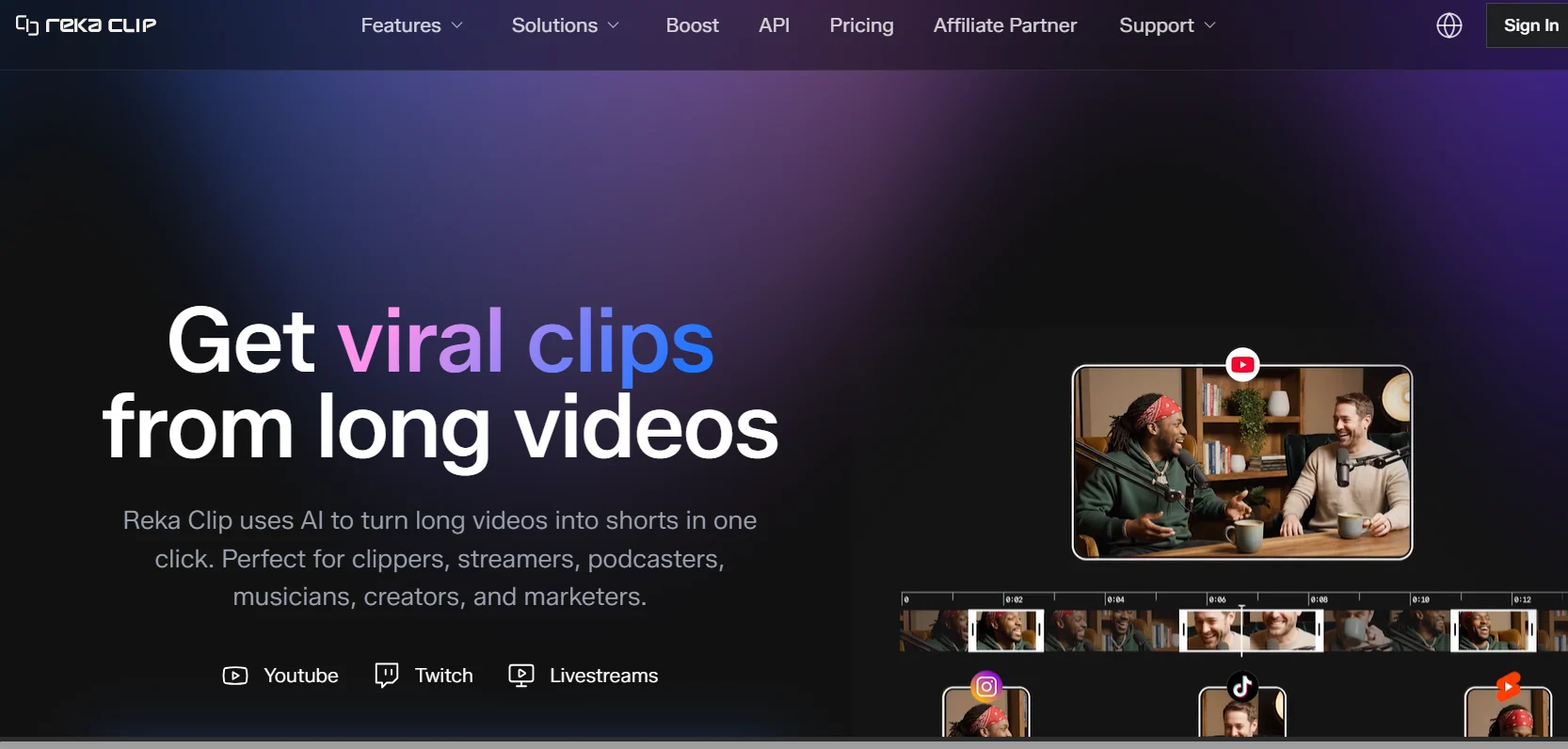
Reka Clip Review: The AI Clip Generator That Turns Long Videos Into Viral Shorts Automatically

Here is something every content creator eventually runs into: you record an hour-long podcast, finish a webinar, or publish a long YouTube video — and then someone on social media asks if you have any short clips they can share. You know the content is good. You know there are genuinely compelling moments buried in that recording. But digging through a full hour of footage, scrubbing the timeline, cutting clips, resizing for vertical format, adding captions, and exporting for each platform? That's a separate job on top of the job you already did. And if you publish regularly, that job never ends. Reka Clip was built to automate exactly that problem.

Short-form content is not a trend that is slowing down. TikTok, YouTube Shorts, and Instagram Reels continue to drive massive amounts of discovery for creators across every niche. The creators winning on those platforms are not necessarily the ones producing the most polished short-form content from scratch — they are often the ones who figured out how to consistently repurpose their existing long-form work into clips that resonate. The challenge is doing that at a pace and volume that actually makes sense given how much content they are already producing.

That is the gap Reka Clip steps into. Instead of scrubbing timelines manually, you upload your video, let the AI find the best moments, review what it surfaces, and export ready-to-publish clips — all without opening a traditional editing tool. This review covers what Reka Clip actually does, how it performs in practice, who gets the most out of it, and where it still has room to grow.

⚡ Quick Summary: Reka Clip at a Glance

  • What it is: An AI-powered tool that automatically detects highlights in long videos and converts them into short viral clips for social media.
  • Best for: YouTubers, podcasters, coaches, online educators, marketers, and agencies who publish long-form video regularly.
  • Key advantage: Eliminates the manual work of identifying, trimming, and formatting clips from long recordings — the AI handles it.
  • Worth considering if: You have a backlog of long-form content you are not repurposing, or you publish regularly and want a faster clip workflow.
  • Verify pricing: Check the official Reka Clip website for current plans — pricing in this category changes frequently.

What Is Reka Clip?

Reka Clip is an AI-powered video repurposing platform focused on one specific and genuinely valuable job: taking long videos and automatically finding the best short clips inside them. You do not need to watch the whole video again, manually mark in and out points, or know anything about video editing. The AI does the analysis, identifies the strongest moments, and generates clips you can review and publish.

The platform sits at the intersection of a few things that content creators need right now: speed, volume, and multi-platform reach. A single podcast episode or YouTube video might have five, ten, or more strong moments worth sharing as short clips. Doing that manually for every piece of content you publish is a part-time job. Doing it with an AI clip generator like Reka Clip compresses that entire workflow into minutes.

The target audience is wide but consistent. YouTubers looking to grow on Shorts. Podcasters who want to drive listeners from social media. Online coaches and educators who want to highlight key teaching moments from their courses or webinars. Marketing teams who produce video content for brand building. Agencies managing social media output across multiple clients. What they all share is a large body of long-form video and a need to extract more short-form value from it without proportionally increasing the time they spend on post-production.

The supported content types span most of the common formats: recorded video podcasts, YouTube videos, webinars, interviews, online course recordings, livestream replays, and conference talks. Anything where the primary content is spoken and recorded on camera or audio tends to work well. The AI is essentially looking for moments that stand on their own — insight, emotion, humor, a memorable statement, or a compelling argument — and packaging them for a short attention window.

Why Content Creators Need AI Clip Generators

The math on short-form content is pretty hard to argue with in 2026. Platforms are algorithmically prioritizing short-form video in ways that have real consequences for discoverability. Creators who consistently publish short clips get more exposure than those who only publish long-form content — even when the long-form content is objectively better. The platforms have trained their audiences to consume in short bursts first and watch longer if they are already hooked.

The problem is that short-form and long-form content serve different creative purposes and require different production approaches. Good long-form content builds depth. Good short-form content builds reach. Most creators are already spending serious time and energy on the long-form side. Adding a whole separate short-form production pipeline on top of that — without any help — is genuinely unsustainable for anyone who is not running a media company with a full team.

This is exactly where AI clip generators create real leverage. Instead of treating short-form as an entirely separate production track, you treat it as a natural byproduct of the long-form content you are already creating. You record once, publish the long-form version, run the recording through a tool like Reka Clip, and come out with multiple short clips without duplicating your creative effort.

Think about this practically: A podcaster who publishes two one-hour episodes per week might find eight to fifteen strong clip moments per episode. Doing that manually — watching, identifying, trimming, captioning, resizing, and exporting — could easily take two to four hours per episode. Across a year of publishing, that is hundreds of hours of post-production time. An AI clip generator that can surface those moments automatically and handle the formatting does not just save a few minutes per video. It changes the economics of running a content operation entirely.

Beyond time savings, AI clip generators also solve the problem of selection bias. When you review your own content, you tend to favor the moments you worked hardest on or found most interesting during production. But the moments that perform best on social media are often the ones with immediate impact — a surprising statement, a quotable takeaway, a moment of genuine emotion — that you may not consciously identify as highlights when you are too close to the content. AI analysis can surface those moments more objectively than your own editorial instincts.

Key Features of Reka Clip

Features in this category are only as valuable as they are in actual use. Here is an honest look at what Reka Clip offers and where each capability fits in a real content workflow.

AI-Powered Clip Detection

This is the core of what Reka Clip does, and it is worth understanding how it actually works. The AI analyzes your video at multiple levels — transcribing the speech, identifying key topics, detecting changes in energy and pacing, recognizing emphasis patterns, and evaluating the overall narrative arc of the content. From that analysis, it identifies segments that are likely to stand alone as compelling, watchable short pieces.

The practical result is that you do not have to decide where to start and stop a clip. The AI presents you with a set of already-extracted moments, each with a score or ranking reflecting how compelling it determined the segment to be. Your job becomes reviewing and approving rather than discovering and extracting. That shift — from manual search to curated review — is where the time savings actually come from.

For conversational content like podcasts and interviews, this detection tends to work particularly well. The AI is good at finding moments where an idea comes to a natural and satisfying conclusion — the kind of self-contained thought that does not need surrounding context to make sense. For more visual or tightly scripted content, the detection may require a bit more editorial input from you before publishing.

Automatic Highlight Extraction

Once the AI identifies your best moments, Reka Clip handles the extraction automatically. It trims the clip to the appropriate start and end points, handles the transition in and out, and packages each segment as a standalone piece of video. You are not doing any manual cutting — the clip arrives already trimmed based on the AI's analysis of where the moment naturally begins and ends.

This matters more than it might seem at first. One of the most time-consuming parts of manual clipping is finding the right in-and-out points — starting a clip slightly too early captures a lot of silence and awkward setup, while ending it slightly too late loses the momentum. Getting those beats right takes judgment and repeated playback. The AI does this automatically and gets it right at a level that requires minimal correction in most cases.

Viral Moment Identification

Reka Clip is specifically designed around the idea of virality — not in a vague aspirational sense, but in a technically concrete one. The AI is trained to recognize patterns associated with high-engagement short-form content: strong hooks, clear takeaways, quotable statements, emotional peaks, and moments of genuine insight or surprise. These are the qualities that drive replays, shares, and comments on short-form platforms.

This distinction is important. A generic clip extractor might give you random segments of your video. Reka Clip is attempting to give you the segments most likely to perform — to stop someone mid-scroll, get watched to the end, and be shared. Whether its judgment consistently matches your audience's response is something you will only know by testing, but the intent and architecture of the analysis is built around performance rather than just extraction.

Smart Captions

Captions are no longer optional for social media video. Studies consistently show that a majority of social media video is watched without sound, and uncaptioned content gets scrolled past by viewers who cannot or choose not to use audio. Reka Clip generates captions automatically from the speech in your video, formatting them to appear in sync with the audio in a way that is readable on mobile screens.

Beyond accessibility, captions also increase the discoverability of your content on platforms that use text from captions for search and recommendation. A clip with accurate captions is essentially captioning itself for the platform's algorithm. For creators who have been skipping captions because of the time required to add them manually, this feature alone can meaningfully change their clip performance.

Social-Media-Ready Formatting

Every social media platform has its own requirements for video dimensions, aspect ratios, and file specifications. TikTok and Instagram Reels want vertical 9:16 video. YouTube Shorts has its own requirements. LinkedIn and Twitter have different optimal formats again. Resizing and reformatting a single clip for all of these destinations manually — especially after you have already produced multiple clips from a single video — adds up quickly.

Reka Clip handles platform-specific formatting automatically at export. You tell the tool which platforms you are publishing to and it outputs clips in the appropriate dimensions for each. You do not need to know the exact pixel dimensions of a TikTok video or manually reframe a horizontal clip for vertical display. The AI handles intelligent reframing to keep the speaker in focus when switching between aspect ratios, which is a meaningful quality-of-life feature for anyone publishing across multiple platforms.

Speaker Tracking

For interview content or multi-speaker podcasts, speaker tracking keeps the video focused on whoever is speaking at any given moment. This is particularly valuable when reframing horizontal content to vertical format — without speaker tracking, a static crop of a wide shot might leave the active speaker off-center or partially out of frame, making the clip look unpolished.

Speaker tracking analyzes where the speaker is in the frame throughout the clip and dynamically adjusts the crop to keep them centered and appropriately framed. The result is a vertical clip that looks like it was intentionally shot for vertical consumption rather than awkwardly cropped from a wide-angle recording. For podcasters who record on camera or use video conferencing setups, this makes a real difference in the presentation quality of their clips.

Podcast Clip Maker

Reka Clip's podcast functionality deserves its own attention because podcast repurposing is one of the highest-volume use cases for this kind of tool. Long podcast episodes are rich with quotable, shareable moments that most podcasters simply do not have time to surface and promote consistently. The podcast clip workflow in Reka Clip is designed around this: upload the episode, get multiple clip suggestions back, review them quickly, and add them to your social publishing queue.

This changes the economics of podcast promotion. Instead of promoting each episode with a single audiogram or a quote card, you can publish multiple short video clips from the same episode across the week — keeping the episode in circulation longer, reaching different segments of your audience, and driving more total listens without recording any additional content.

YouTube Repurposing

For YouTubers specifically, the ability to automatically generate YouTube Shorts from longer videos is a direct channel growth tool. The YouTube algorithm increasingly uses Shorts as a discovery mechanism for full-length channels — viewers who find your channel through a Short are among the most engaged subscribers, because they discovered you through content that immediately demonstrated your value.

Reka Clip streamlines this by letting you process a long YouTube video and export the resulting clips in Shorts-ready format. This means every long video you publish can also feed your Shorts strategy without requiring a separate production session for each one.

Multi-Platform Export

The combination of automatic clip detection, smart captions, and platform-specific formatting means that by the time a clip reaches the export stage, it is genuinely ready to publish — not ready to be further formatted, not ready after you add captions, but ready to upload. Multi-platform export lets you get clips for TikTok, YouTube Shorts, Instagram Reels, and other destinations from a single workflow without revisiting the video for each platform separately.

Fast Processing

Processing speed matters practically because it affects how clips fit into your publishing schedule. A tool that takes four hours to process a one-hour video is not going to fit naturally into a same-day publishing workflow. Reka Clip is designed for fast processing — typically delivering results in a fraction of the video's running time — which means you can realistically turn around clips within hours of publishing the original long-form content. That speed allows for timely social publishing while the original content is still fresh and earning initial views.

How Reka Clip Works

The workflow is genuinely straightforward, which is one of the reasons the platform works well even for creators who are not technically inclined. Here is how it flows from start to published clip.

Step 1 — Upload Your Video: You start by uploading your long-form video directly to Reka Clip. Depending on the platform's current integrations, you may also be able to connect via URL for content already published to YouTube or other hosting platforms. Supported formats include the common video file types used by cameras, screen recorders, and video conferencing software.

Step 2 — AI Analyzes Your Content: Once uploaded, the AI begins processing the video. It transcribes the audio, analyzes the content structure, identifies speaker patterns, evaluates energy levels throughout the recording, and builds a picture of where the most compelling and self-contained moments occur. This happens automatically without any input from you during processing.

Step 3 — Highlights Are Detected and Ranked: After processing, Reka Clip presents you with a set of identified highlights. Each suggested clip typically shows you the transcript of the segment, a preview of the video, and some indication of why the AI selected it — what made it stand out as a candidate for a short clip. Clips are often ranked or scored so you can quickly identify the strongest candidates.

Step 4 — Clips Are Generated: The platform automatically generates the actual short clips from the identified moments — trimmed, formatted, and with captions applied. You are not just getting timestamps and having to do the cutting yourself; the clips arrive already packaged.

Step 5 — Customize Your Output: Before exporting, you have the ability to make adjustments. This might include tweaking the start and end points of a clip, editing caption text for accuracy or emphasis, adjusting the caption styling, reordering elements, or selecting which clips to take forward and which to discard. You stay in control of what actually gets published.

Step 6 — Export and Publish: Select your target platforms, choose the appropriate format for each, and export. The clips come out formatted and ready to upload directly to TikTok, Instagram, YouTube Shorts, LinkedIn, or wherever you publish. No further reformatting required — just upload and schedule.

Real Use Cases

Understanding where Reka Clip creates the most concrete value requires looking at specific types of creators and how the tool changes their workflow in practice.

YouTubers

The Long-Form YouTuber Growing on Shorts Without Extra Recording

A YouTuber publishing weekly twenty-to-sixty-minute videos wants to grow their Shorts channel to boost overall discoverability but does not want to spend another day each week recording short-form content from scratch. With Reka Clip, they can process each long video immediately after publishing and get five to ten Shorts candidates ready to review. Spreading those Shorts across the week keeps the channel consistently active on both feeds without any additional filming. The ROI is straightforward: more reach, same recording schedule, minimal added post-production time.

Podcasters

The Podcaster Who Has Stopped Promoting Episodes After Publishing Them

Most podcasters publish an episode, send it to their RSS feed, and move on. The episode might get promoted once or twice in the first few days and then effectively disappears. Reka Clip changes this pattern by turning each episode into a stream of social content that can be published over the following week or two. A one-hour episode might yield eight to twelve solid clips. Publishing two per day for a week from a single episode gives the audience multiple entry points and keeps the episode in rotation across social feeds long after its original release date.

Coaches

The Online Coach Building Authority Through Short-Form Content

Coaches and consultants often have extensive libraries of recorded calls, sessions, webinars, and training content. That content is full of moments where they deliver clear, actionable insight — exactly the kind of value that performs well as short-form video. But sitting through recordings to identify those moments manually is time they simply do not have. Reka Clip lets coaches run their existing session recordings through the AI and extract the most insight-dense moments for social publishing — building authority and attracting new clients from content they have already created.

Educators

The Online Educator Promoting Courses With Clip Highlights

Course creators who teach on platforms like Udemy, Teachable, or their own websites often struggle with marketing their courses effectively once they are published. Short clips of the most compelling teaching moments from inside a course can function as genuinely useful free content on social media while simultaneously serving as a preview that drives enrollment. Reka Clip enables educators to extract those teaching highlights without re-editing their entire course footage — a meaningful leverage point for course promotion on a lean budget.

Agencies

The Content Agency Managing Short-Form Output for Multiple Clients

A social media or content marketing agency responsible for maintaining consistent social output for several clients faces a scaling problem: the volume of short-form content required across multiple client accounts is enormous relative to the time available to produce it. Reka Clip's ability to process client video quickly and generate multiple clips per video makes it a practical efficiency tool at agency scale. Instead of a team member spending hours per client manually clipping content each week, the AI handles the heavy lifting and the team focuses on quality review and editorial decisions before publishing.

Marketers

The Content Marketer Squeezing Maximum Value From Video Production Budget

Marketing teams that invest in video production — interviews, brand stories, product explainers, event coverage — need to justify that investment across as many channels as possible. A single well-produced video should not just live on the website's resources page; it should generate social content, email content, and ongoing paid ad creative. Reka Clip makes multi-platform repurposing practical enough to actually do consistently rather than as a one-off exercise when someone has extra time, which almost never happens in a busy marketing team.

Business Owners

The Founder Building a Personal Brand on Social Media

Entrepreneurs and small business owners who record content — whether that is a weekly live Q&A, a customer interview, a town hall with their team, or a keynote they delivered at an event — have a natural source of short-form content they are mostly not using. Recording a monthly live session and running it through Reka Clip can generate weeks worth of short clips that build the founder's personal brand consistently without requiring them to commit to a regular short-form recording schedule. The content already exists — the tool just helps them actually use it.

Benefits of Using Reka Clip

The cumulative case for Reka Clip is not built on any single feature. It is built on what changes when you stop treating content repurposing as a separate production job and start treating it as an automatic byproduct of the content you are already creating.

  • Saves significant editing time: The difference between manually clipping a one-hour video and running it through Reka Clip is measured in hours, not minutes. Over a year of consistent content publishing, that compounds into weeks of reclaimed time.
  • Increases your content output without extra recording: More short clips from existing content means more touchpoints with your audience across platforms — without any additional recording sessions or creative effort beyond what you have already done.
  • Expands your platform reach: Short-form content is the primary discovery mechanism on most social platforms right now. More clips means more chances to reach people who have never encountered your long-form content.
  • Reduces the barrier to repurposing: Most creators know they should be repurposing their content more consistently. The reason they do not is that it is genuinely tedious and time-consuming. Removing that friction changes behavior. When repurposing takes minutes instead of hours, it actually gets done.
  • Extends the life of each piece of content: A long video is relevant for a day or two after publication if you only promote it once. The same video, promoted through ten clips spread over two weeks, stays in circulation far longer and drives more total engagement.
  • Improves social media consistency: One of the biggest challenges for creators is maintaining a consistent publishing schedule across platforms. Having a backlog of clips generated from your long-form content gives you a reliable source of social content even on weeks when you do not have time to create anything new.
  • Handles the technical formatting work: Platform-specific formatting, aspect ratio adjustments, caption generation — these are tasks that are individually simple but collectively time-consuming. Reka Clip handles all of them automatically.
  • Enables data-driven iteration: Publishing multiple clips from each video gives you a dataset for understanding which moments and formats resonate most with your audience. That feedback loop improves your long-form content strategy over time.
  • Scales with your content volume: Whether you publish one video per month or one per day, the workflow is the same. The platform scales to match your production volume without proportionally scaling the time you spend on post-production.

Pros and Cons

✓ Pros

  • Automates the most time-consuming part of video repurposing
  • AI identifies genuinely compelling moments, not just random segments
  • Automatic caption generation improves reach and accessibility
  • Platform-specific formatting handled at export
  • Speaker tracking for professional vertical video reframing
  • Works especially well for podcasts, interviews, and talking-head content
  • Fast processing fits into same-day publishing workflows
  • No video editing experience required to get results
  • Multi-platform output from a single workflow
  • Extends the value and reach of existing long-form content
  • Strong fit for creators, agencies, and marketing teams alike
  • Reduces content backlog by making repurposing sustainable

✗ Cons

  • AI clip accuracy varies for highly technical or non-conversational content
  • Human review and light editing still recommended before publishing
  • Caption accuracy depends on audio quality — noisy recordings may need correction
  • Processing times increase with very long videos
  • Pricing should be verified directly — changes frequently in this market
  • Best results require good source content — the AI cannot fix poor audio or unclear delivery
  • Customization options may be more limited than full manual editing software

Reka Clip Pricing Overview

Pricing in the AI video tools space is one of the most volatile things to track right now. Platforms in this category are actively experimenting with subscription structures, usage-based billing, and tiered access models — and those structures often shift meaningfully within a single year of a product's lifecycle. Rather than quote specific numbers that could be outdated by the time you read this, here is how the economics typically work for tools like Reka Clip.

Plans in this category tend to be structured around video processing volume — specifically how many minutes of long-form video you can process per month. Entry-level plans typically suit individual creators or small podcasters with one or two videos per week. Mid-tier plans accommodate higher-volume creators and small teams. Higher-tier plans are generally designed for agencies managing multiple clients or businesses with significant ongoing video production.

The value case for paying for a tool like Reka Clip depends on your current publishing volume and the time cost of your manual clipping workflow. If you publish two or more long videos per week and are currently spending hours per week on manual repurposing, the math is usually favorable — particularly when you factor in the consistency and volume of clips the tool enables compared to what you were producing manually.

For the most accurate and current pricing, go to the official Reka Clip website directly. Look specifically for whether a free trial or free tier is available — most platforms in this category offer some form of trial access that lets you evaluate the clip quality and workflow before committing to a subscription.

Reka Clip vs Traditional Video Editing

To understand where Reka Clip actually fits in a content production workflow, it helps to compare it directly against the manual alternative most creators use today.

Aspect Traditional Manual Clipping Reka Clip
Highlight identification Manual scrubbing and judgment — hours per video AI-automated detection in minutes
Clip trimming Manual in-point and out-point selection in editor Automatic trimming to natural start and end points
Caption generation Manual transcription or separate captioning tool Automatic caption generation included
Vertical reframing Manual repositioning and cropping in editor AI speaker tracking and intelligent reframing
Platform formatting Separate export for each platform's requirements Automatic platform-specific formatting at export
Skill requirement Proficiency with video editing software required No editing experience needed
Time per video Two to four hours for a one-hour video Fifteen to thirty minutes including review
Consistency Depends on editor availability and energy Consistent quality regardless of workload
Scalability Proportional time increase with more content Same workflow regardless of video volume
Cost Time cost or contractor fees for each video Fixed subscription covering all processing

Reka Clip vs Other AI Clip Generators

Reka Clip is not the only AI clip generator on the market. Several well-established tools operate in the same space, and a fair comparison requires acknowledging what each does well rather than pretending there is a single obvious winner.

Feature Reka Clip Opus Clip Vidyo.ai Munch Submagic
AI clip detection ✓ Yes ✓ Yes ✓ Yes ✓ Yes Limited
Auto captions ✓ Yes ✓ Yes ✓ Yes ✓ Yes ✓ Yes
Speaker tracking ✓ Yes ✓ Yes ✓ Yes Partial Limited
Multi-platform export ✓ Yes ✓ Yes ✓ Yes ✓ Yes ✓ Yes
Viral scoring ✓ Yes ✓ Yes Moderate ✓ Yes No
Podcast focus ✓ Strong ✓ Strong Moderate ✓ Strong Moderate
Ease of use High High High Moderate High

The honest picture is that several tools in this category are reasonably capable, and the differences between them often come down to workflow preferences, specific platform integrations, and pricing relative to your usage volume rather than a single feature that makes one definitively superior. Reka Clip's focus on viral moment identification and its clean end-to-end workflow makes it a strong contender for creators who want results with minimal manual intervention. The best approach is to try a free trial — if available — with your actual content rather than relying solely on feature comparisons made on a spec sheet.

Tips for Getting Better Viral Clips

Even the best AI clip generator produces better results when you approach it intentionally. Here are practical things that make a real difference in clip quality and performance.

  • Start with strong source content: The AI is finding the best moments inside your video, but it cannot create compelling moments that are not there. Content that is naturally energetic, specific, and quotable will produce stronger clips than content that is vague or monotone. Think about what moments in your content would make someone stop scrolling before you record.
  • Deliver clear value quickly: The clips that perform best on short-form platforms are usually the ones where the value or insight is apparent within the first few seconds. When you are recording, practice getting to the point faster — it will improve both your long-form content and the clips the AI extracts from it.
  • Focus on audience pain points: Content that directly addresses a problem your audience has tends to generate stronger clips than general commentary. Specific, actionable moments — "here is exactly why X happens and what to do about it" — are far more shareable than general observations.
  • Always review AI suggestions before publishing: The AI does excellent work at identifying candidates, but you know your audience better than any algorithm. Review each suggested clip, discard any that feel off, and lightly trim any where the start or end point could be sharper. Ten minutes of review before publishing is time well spent.
  • Use captions — and check their accuracy: Automatic captions are accurate most of the time, but accuracy drops with accents, technical terminology, or poor audio quality. Quickly scan the caption text before publishing to catch any significant errors that could undermine the clip's credibility.
  • Optimize your hooks: The first two to three seconds of a short clip determine whether someone keeps watching or scrolls past. If the AI-generated clip does not open on a strong moment, consider trimming it slightly so it starts with the most compelling part of the segment rather than the setup.
  • Publish consistently rather than in bursts: Spreading clips across the week produces better algorithmic results on most platforms than publishing multiple clips on a single day. Build a simple scheduling habit around your clip output to maintain consistent presence without overwhelming your audience.
  • Test different formats: If your platform of choice supports multiple short-form formats, test clips of different lengths. A fifteen-second clip and a sixty-second clip from the same moment will often perform differently — understanding which format your specific audience prefers helps you prioritize at export.
  • Use your clips to drive back to long-form: Always include a call to action in your clip description pointing to the full episode or video. The goal of short-form repurposing is not just to get views on the clips — it is to convert clip viewers into long-form subscribers. Make it easy for them to find the original content.

Who Should Use Reka Clip?

Reka Clip is a focused tool with a clear use case. Being honest about who it serves best — and who might be better served elsewhere — is more useful than claiming it is for everyone.

YouTubers who publish long-form content regularly and want to grow their Shorts channel or cross-publish to TikTok and Reels without a separate recording schedule will find Reka Clip fits naturally into their existing workflow. The more consistently you publish, the more value you get from automating the clip extraction process.

Podcasters are arguably the most natural fit for this category of tool. Podcast episodes are long, rich with quotable moments, and almost universally under-promoted on short-form video platforms. Reka Clip gives podcasters a practical path to social video distribution that would otherwise require either hiring an editor or committing significant manual time each week.

Coaches and consultants who record their sessions, workshops, or live events have existing content libraries that are almost certainly not being repurposed at anywhere near their potential. Reka Clip makes it practical to extract ongoing social content from that library without dedicating specific production time to it.

Online educators can use Reka Clip to promote their courses with genuine highlight moments rather than just trailers or talking-head promotional content. Clips of the actual teaching value inside a course are among the most effective promotional content for course enrollment.

Marketing agencies that manage social media content for clients producing video will find Reka Clip reduces the time cost of clip production enough to make it economically viable at the volume and frequency their clients expect.

Founders and business owners who record any kind of video content — interviews, AMAs, webinars, event talks — and want to maintain a visible social presence without a dedicated content team will find this tool lowers the barrier enough to make consistent publishing realistic.

Who should look elsewhere: Creators who primarily produce visual content without significant spoken audio — cooking videos, cinematic travel content, music performances, ASMR — will get less value from AI clip detection that relies heavily on speech analysis. Similarly, creators who need deep creative control over every aspect of their clip styling and presentation may find the customization options more limited than a full manual editing workflow allows. For those use cases, traditional editing software remains the right choice.

Frequently Asked Questions

What is Reka Clip?

Reka Clip is an AI-powered video repurposing tool that automatically analyzes long-form videos and identifies the most engaging moments. It then extracts those moments as short clips formatted for social media platforms like TikTok, YouTube Shorts, and Instagram Reels. The platform is built for creators, podcasters, marketers, coaches, and businesses who want to maximize their long-form content's reach without spending hours on manual editing.

Can Reka Clip convert long videos into short clips automatically?

Yes — that is its primary function. You upload a long video, the AI identifies the strongest moments, and it generates multiple short clips automatically. You review the suggestions, make any light adjustments, and export ready-to-publish clips. The entire process takes a fraction of the time manual clipping would require, especially for longer videos.

Does Reka Clip generate captions automatically?

Yes. Automatic caption generation is included as part of the workflow. Captions are applied to the generated clips with synced timing. It is worth reviewing caption accuracy before publishing — especially if your recording has heavy accents, technical terminology, or lower audio quality — but for most conversational content, the accuracy is strong enough that corrections are minor and quick.

Is Reka Clip suitable for podcasters?

Podcasters are among the best-suited users for this kind of tool. Long podcast episodes are full of shareable moments that most podcasters simply do not have time to find and promote individually. Reka Clip's AI identifies those moments automatically, making it practical to publish multiple clips per episode consistently — which significantly extends each episode's promotional reach and lifespan on social platforms.

Can beginners use Reka Clip?

Yes. The workflow is genuinely accessible to people with no video editing background. You upload, the AI processes, you review the suggestions, and you export. There is no timeline scrubbing, no technical format knowledge required, and no learning curve around editing software. If you can upload a file and click through a review interface, you can use Reka Clip effectively.

Does Reka Clip support exports for different social media platforms?

Yes. Multi-platform export with platform-specific formatting is one of Reka Clip's practical strengths. It handles the different aspect ratios and format requirements for TikTok, Instagram Reels, YouTube Shorts, and other destinations automatically. You do not need to know the specific pixel dimensions for each platform or manually reframe clips — the tool handles that at export.

How accurate is the AI clipping in Reka Clip?

Accuracy is generally strong for conversational content — podcasts, interviews, webinars, and talking-head videos where the AI can analyze speech patterns and identify natural peaks in the content. Results are typically less accurate for highly technical content with lots of specialized vocabulary, or for content with significant background noise or unclear audio. Reviewing the AI's suggestions before publishing is always recommended and typically takes only a few minutes per video.

Is Reka Clip worth trying for YouTube repurposing?

For YouTubers who publish long-form content regularly, the repurposing use case is strong. YouTube's own algorithm gives Shorts a discovery advantage for channels, and having a consistent stream of Shorts from your existing long-form content can meaningfully grow your subscriber base. Whether the specific output quality justifies the subscription depends on your volume — the more you publish, the more value you extract from automating this workflow.

What types of videos work best with Reka Clip?

Reka Clip performs best with content where talking is the primary format — podcasts, interviews, webinars, course recordings, panel discussions, keynotes, and YouTube videos with significant spoken content. These give the AI clear audio to transcribe and analyze for compelling moments. Purely visual content without substantial spoken audio tends to yield less accurate automatic clip detection.

How much does Reka Clip cost?

Pricing evolves frequently in this category, so the most accurate source is the official Reka Clip website. Plans are typically structured around monthly video processing volume, with tiers designed for individual creators up through agency-level users. Look for free trial availability — most platforms in this space offer a way to try before committing to a subscription — so you can evaluate the clip quality with your own content before paying.

Final Verdict

🏆 Our Assessment: Reka Clip

Reka Clip addresses a real and growing pain point for content creators: the gap between the long-form content they are already producing and the short-form clips they know they should be publishing but do not have time to create manually. The platform's AI-powered highlight detection, automatic caption generation, and platform-specific formatting combine into a workflow that genuinely compresses what used to be hours of post-production into minutes of review and export. For creators publishing long-form video regularly, that time savings is not a marginal convenience — it is a meaningful shift in what is actually possible to sustain week after week.

The platform's strongest value proposition is not any individual feature — it is the combination of automation at each step of the repurposing workflow. You are not just getting faster clip trimming. You are getting AI-identified highlights, automatic captions, intelligent reframing, and multi-platform formatting all in one connected process. That end-to-end automation is what makes the workflow genuinely different from manually clipping in traditional editing software.

That said, Reka Clip is not a replacement for editorial judgment. The AI does excellent work surfacing candidates — it is consistently faster and more systematic than human review — but you still know your audience better than the algorithm does. The optimal workflow is AI-first with human final review, not AI-only. Treating the AI's output as a strong starting point that you verify and lightly refine before publishing is a more reliable approach than publishing without review, at least until you have calibrated how the tool performs on your specific content type and style.

For YouTubers, podcasters, coaches, online educators, and marketing teams producing consistent long-form video, Reka Clip is worth a serious look. If you are currently under-repurposing your content because the manual process is too slow to sustain, or if you are already spending significant time on clip creation and want to reclaim that time, the workflow improvement is real and immediate. AI-powered content repurposing has crossed the line from interesting experiment to practical production tool — and for long-form video creators, that shift is worth taking seriously.

Want to stay on top of the AI tools actually changing how creators and marketers work? Explore more in-depth, honest reviews and practical guides on RapidFast — no hype, just what works.